Voice has been our proving ground for a new kind of interaction model - intents, instructions, and guided sequences that let a caller say what they actually want while still being walked through a precise procedure. It works beautifully there, so this summer we brought it to digital too. Smart Triage now works in both, and the retrieval engine underneath got significantly faster and smarter for everyone.
We've also kept pushing hard on the thing that matters most to the brands we work with: handling product pre-sale assistance and support for genuinely complex products and large product portfolios well. There's a lot in here on that front.
Let's dig in!
One interaction model, across voice and digital
Intents and instructions now work in digital flows, exactly the way they have in voice.
Every brand has a handful of topics that deserve special attention: the questions that arrive thousands of times a month, the procedures where exact behaviour/steps matters, the journeys that need to happen in a specific order. Intents and instructions let you give those topics deliberate, precise handling - you define what the AI agent should recognise, and exactly what it should do about it. Everything else - the long tail of questions nobody could enumerate in advance - stays covered generatively.
Instruction sequences take this into multi-step territory. Priority topics often aren't single answers but processes - a descaling guide, an onboarding path, a warranty claim where data needs collecting in the right order. Sequences let the assistant walk the user through one step at a time, branch on what they say, use agentic “tools” along the way, and escalate cleanly when needed. It's the same multi-step agentic capability we introduced for voice in the last edition, now available in digital too.
All of it works across both Generative and Hybrid experiences - in assistants and Dynamic Help Centres alike.
Faster answers, without giving up depth
Two of the balances I wrote about in the July edition were speed and depth. This period we made real progress on both at the same time.
Agentic retrieval for hybrid search
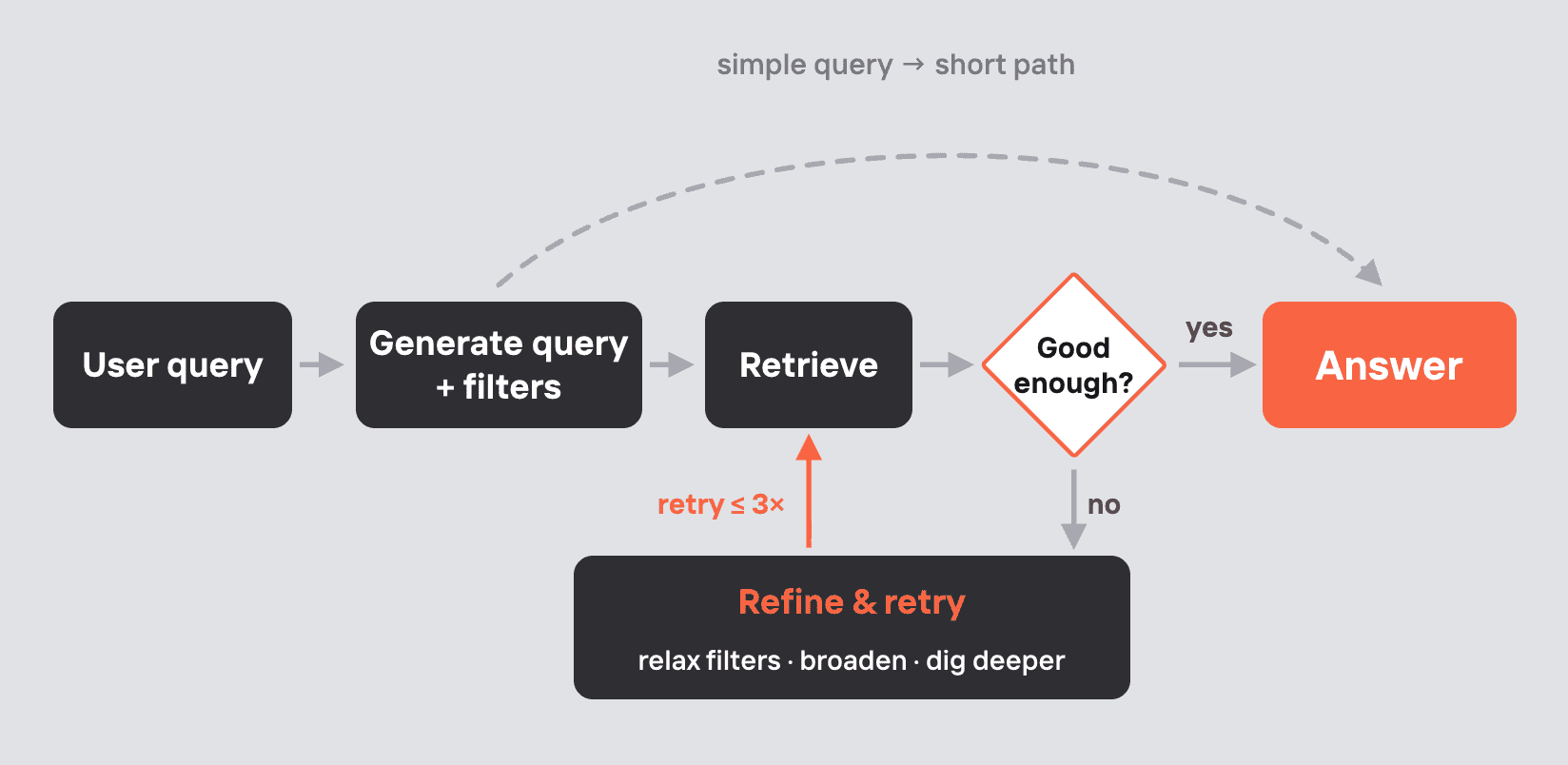
The AI agent now adapts its effort to the difficulty of the user's question. Straightforward questions get answered quickly. Harder ones trigger an iterative approach: the assistant searches, assesses how good the results actually are, and decides whether to answer or try again with a different strategy.
Underneath there's deeper query understanding, a fast reasoning step that judges result quality, and a routing layer that picks the next search strategy when another pass is worthwhile. The practical effect is exactly the trade-off you'd want the system to make on its own: fast answers on easy questions, better answers on hard ones. It's already live for everyone, and we'll keep tuning each component using production insights over the coming weeks.
Complex sources are now roughly twice as fast
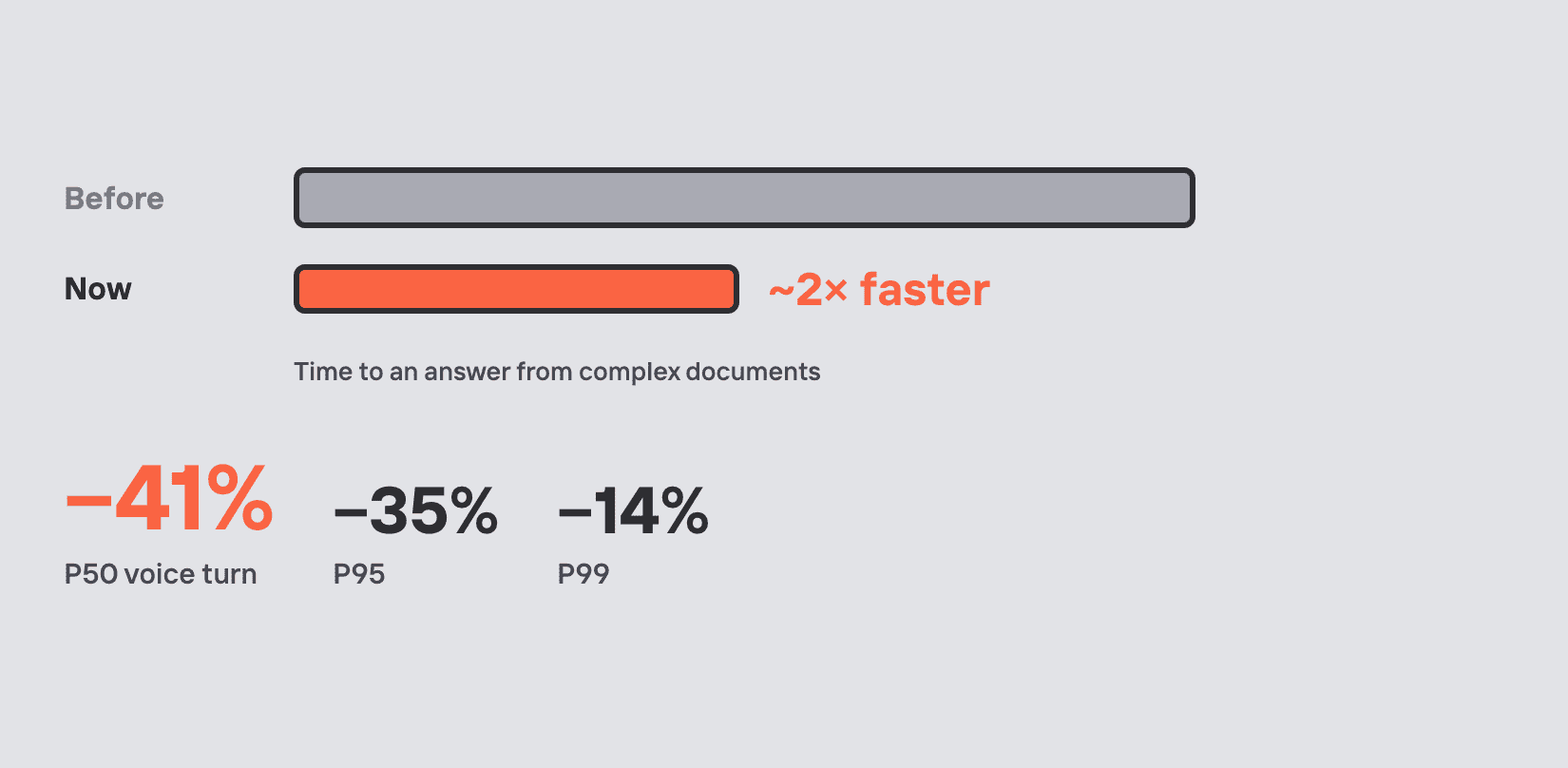
In July I wrote about our complex page classifier, which routes dense manuals and technical spec sheets to a more advanced processing path. That path leans on a vision model to genuinely read the page, which is real work - but it added up a couple of seconds before an answer appeared. A focused round of optimisation has cut that roughly in half. Answers from documents of any complexity now land in comparable territory, which is especially noticeable for brands with a lot of dense source material.
Sturdier document processing
Document processing is the foundation of every generative answer - if an uploaded document doesn't get indexed, the AI can't draw on it. We went deep on the failure patterns and improved the “plumbing”. Upload failure rate is now well under 1%, and the failures that do occur surface as clear, understandable errors at upload time.
Built for large, complex product portfolios
This is the part of the market we've always focused on, and two updates this period make Mavenoid noticeably stronger in it.
Generative condition questions in Hybrid
When a user's question could apply to several products, the assistant needs to clarify before it answers. For a handful of options, a set of buttons works nicely. For a brand with dozens or hundreds of models, a button list isn't the right shape - and if the user's product isn't on it, they can end up stuck.
The assistant can now generate appropriate clarifying questions on the fly, in natural language, and let the user answer in their own words: "To better answer your question about descaling, I need to know your exact model - is it the Classic or the Evo?" It can also confirm an uncertain match ("it sounds like you mean the compact model - is that right?") rather than silently applying the wrong one.
That means Hybrid assistants scale comfortably to large catalogues, and answers land on the right product and model far more often.
Vision Assist can now read SKUs
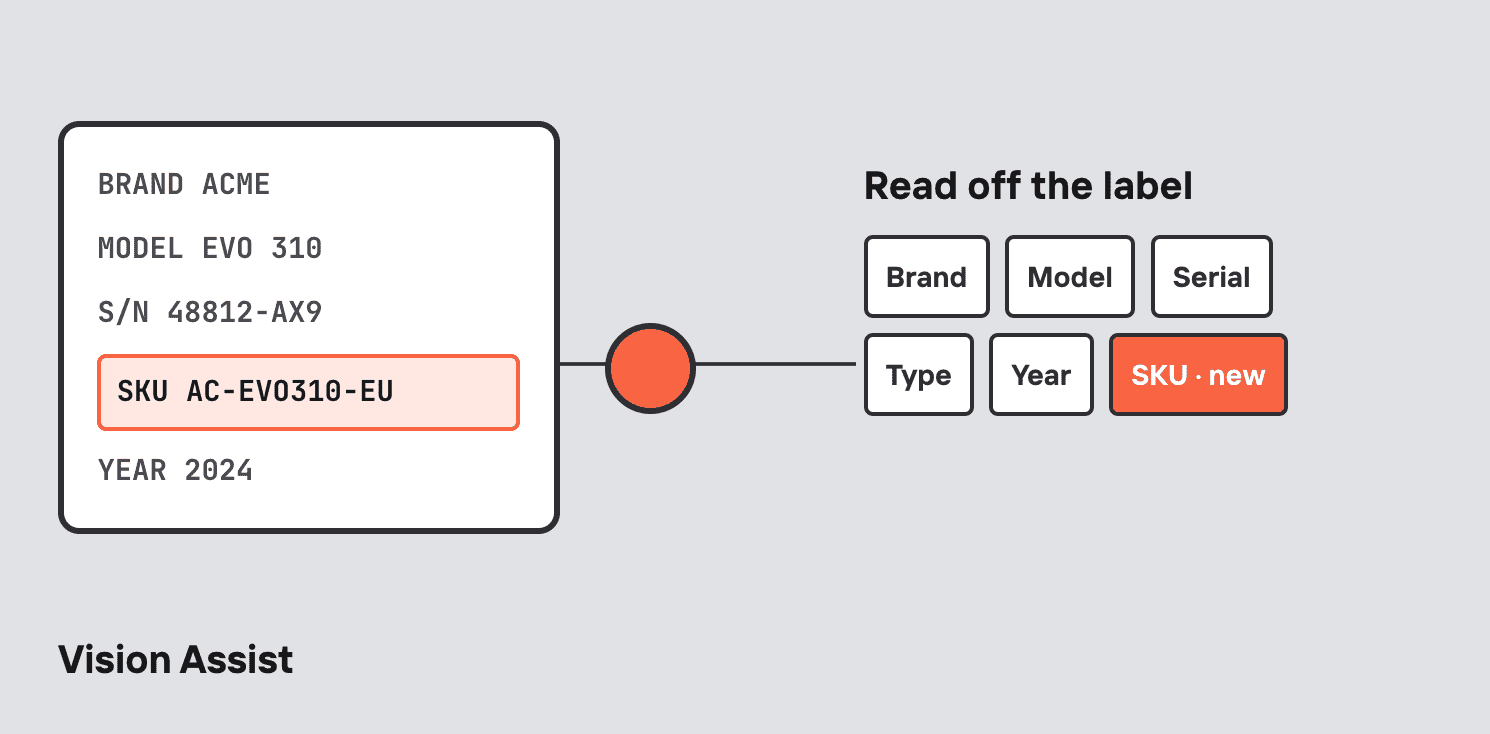
Vision Assist lets users take a photo of a product label so AI can recognise it - instead of typing model numbers by hand. It already extracted brand, model, serial number, product type and year of production - and now SKU as well.
Escalations that arrive with full context
Smart Triage, now in Digital flows
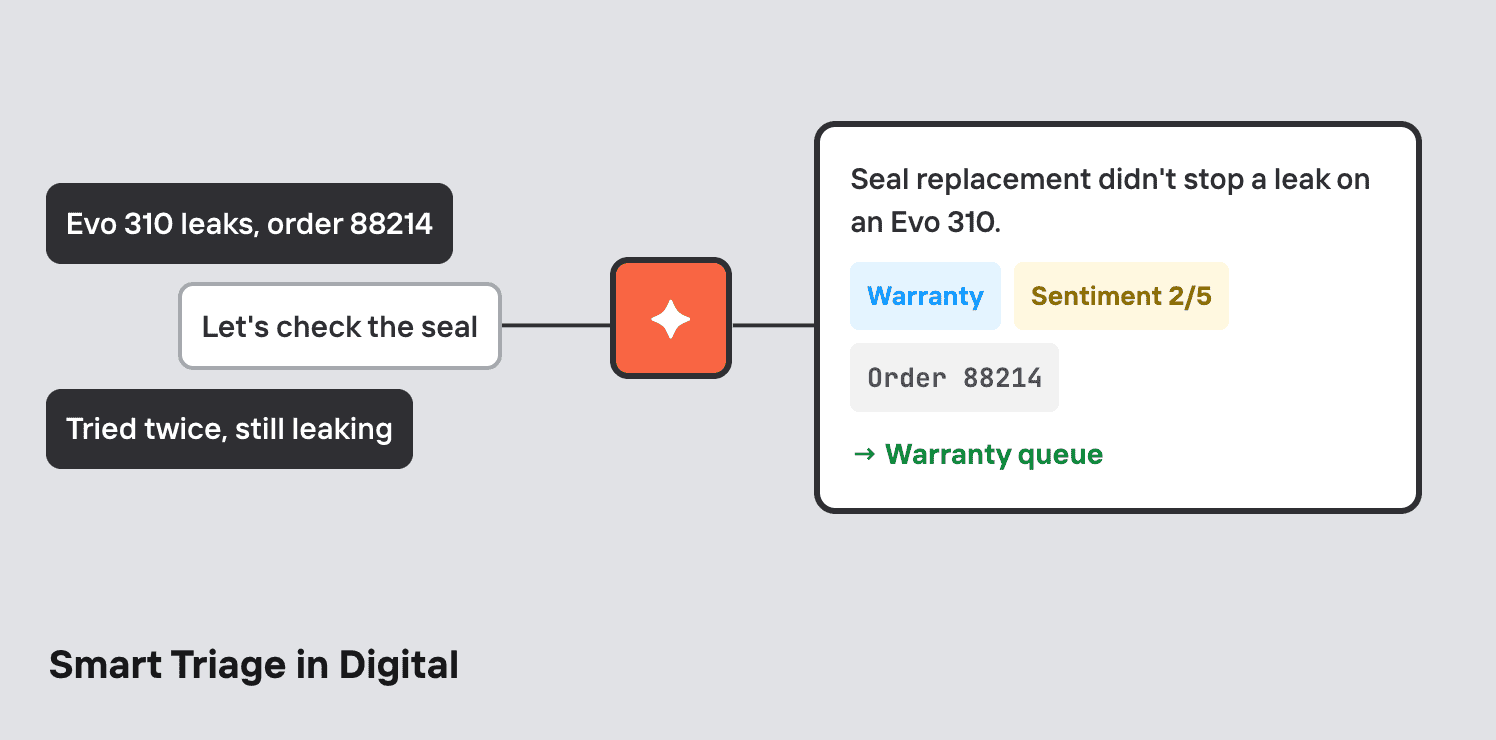
Smart Triage - which has been working successfully in Voice Assist for a while - now works in Digital flows too. Drop an Action node into a flow, add the Run Smart Triage action, and define whatever structured fields you want the AI to extract from the conversation before it hands off:
- a one-line summary of the conversation for the human agent
- the topic or issue type - warranty, sales, troubleshooting, and so on
- a sentiment score: how happy or frustrated the user seemed
- any specific data you need - order number, product ID, email
The result is that chat escalations arrive with rich context. Agents don't have to re-ask what the user already explained, and conversations route to the right queue.
External link redirects now count in Analytics
Sometimes the most useful thing an assistant does is hand a user the right link - a manual, a spare parts page, a dealer locator. Those clicks are now tracked wherever they appear: node descriptions, source citations in generative answers, form fields.
A link click also counts as an engaged conversation, and you can set the analytics status in response to one - marking a session resolved when the user opens the manual, for instance.
Voice Assist: faster and more personal
Noticeably faster responses
We went after the latency of every turn in a voice call and cut it substantially. The typical turn (P50) dropped by ~41% - and the slower tail improved too, by 35% at P95 and 14% at P99. Voice is the channel where latency is felt most acutely, so this is work we'll keep doing.
Better handling of numbers
We've enabled better numerals support in our default speech-to-text model, so spoken numbers now transcribe as digits - "one two three" becomes "123". That means more accurate capture of the codes, order numbers and model numbers callers read out, and cleaner input for everything downstream that depends on them.
A wider choice of voices
We've added Deepgram's latest text-to-speech engine to the provider list, which widens the range of languages, accents and voice "characters" available when configuring an assistant. Worth a listen if you're picking a voice for a new launch - some of the new ones sound remarkably alive.
Personalised instructions
When we shipped instruction sequences, the assistant could move freely between steps - and now it carries the caller's details along with it. Instruction nodes can reference data a tool captured earlier, so a later step can greet someone by name, reference their order, or tailor a procedure to their specific model. Multi-step agentic processes can now both route and pass data through instructions alone.
Enterprise-ready integrations, and quality of life
Multiple connections per integration
Some brands run more than one account for the same tool - two or three Salesforce organisations across different regions, say - and their flows need to talk to all of them.
Our Integrations module now supports multiple connections per third-party integration. You can add several connections to the same integration, label them so they're easy to tell apart, see which flows use each one, disconnect them individually, and nominate a default so existing flows keep working unchanged. In each flow you then choose which connection to use, across assets, actions and knowledge imports.
For large enterprises with a sprawling tool estate, this means keeping the tooling you already have and putting Mavenoid's self-service layer on top of all of it.
Advanced forms: field dependencies
Every form field now has an "Only show when" toggle. Turn it on, add rules, and the field appears or disappears in real time as the user fills in the form - show State only when Country = US, show a free-text box when someone picks Other, and so on. It supports AND/OR logic, doesn't submit hidden fields, remembers values, and works with undo.
This is the first and biggest step in a broader Advanced Forms initiative; selection groups (visual multi-select and radio buttons inside forms) are next.
And a few smaller ones
- Website import errors now tell you exactly what went wrong and how to fix it - click the failed asset to see the detail.
- The node editing panel can be expanded, which makes editing long text far more comfortable.
- Condition options can no longer be deleted while assets still reference them. If you try, you'll see exactly where the option is used, so you can clean up safely first.
Got you curious?
If you'd like to see any of these capabilities in action, reach out to your Mavenoid contact or request a demo.
Until next time!